


A demonstration can look impressive while leaving the actual order configuration, workflow, and evidence unclear.
Evaluate a demo by matching its configuration to the proposed order, observing the intended workflow, checking documents and risks, and recording decision gates before you commit.
At Hongdee, we recommend treating a demonstration as a structured procurement review, not a performance. A product seen at a show, video call, or supplier site may not be the same configuration that will be quoted. The questions below help a buyer separate what was observed from what still needs written confirmation.
What should you confirm about the demo configuration?
First, determine whether the demonstration represents the equipment you may purchase. Without traceability, a smooth demo can create confidence in options absent from the quotation.
Record the demonstrated model, configuration, accessories, software, power assumptions, and proposed order line by line, then mark every difference as an open confirmation item.
Build a configuration record
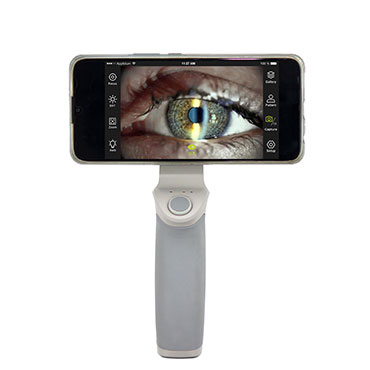
Before the demo begins, record the supplier, model identifier, visible accessories, software version if supplied, and the purpose for which the equipment is being evaluated. Ask which items are standard, optional, demonstration-only, or supplied by a third party. A camera, printer, adapter, stand, or computer can materially change the workflow even when the main instrument looks identical.
We recommend keeping a two-column comparison: “seen during demo” and “included in proposed order.” A third column, “written confirmation required,” prevents an assumption from silently becoming a purchase expectation. The record should also identify whether the demonstration unit is new, a sample, or a different production configuration. We do not infer that performance or accessories observed on one unit will automatically apply to another.
The Hongdee digital slit lamp page can help a buyer identify the product category and available options, but a product page is not a substitute for a configuration-specific quotation. Ask for the exact model and included items in writing.
| Demo item to record | Question for the quotation | Decision if unresolved |
|---|---|---|
| Main instrument and model | Is the quoted unit the same identifier? | Hold technical approval |
| Imaging or software option | Is it included, optional, or third-party? | Request a line-item answer |
| Stand, table, or adapter | Is the shown support equipment included? | Exclude from assumed scope |
| Power and interface needs | What must the buyer provide locally? | Confirm before site planning |
| Documents and accessories | Which items arrive with the shipment? | Add a delivery checklist |
Avoid demo-day substitutions
Ask the presenter to identify any accessory changed during the session. If a supplier uses a different monitor, computer, chair, table, or sample than the quoted package, write that down. The point is not to penalize a demonstration; it is to keep the purchase decision honest. We also ask whether the observed workflow depends on a local network, licensed software, or an operator who has practiced with the unit.
A buyer can then request a short written summary after the demonstration. If the supplier cannot confirm a technical detail immediately, label it pending rather than filling the gap with a sales assumption. That single habit prevents the common error of approving a broad impression instead of a defined order.
Which workflow questions should the demo answer?
A demonstration should show the intended operating sequence, not merely display features. Ask whether users can understand the steps and identify safe limits.
Ask the intended users to observe or perform the planned workflow under supervision, recording steps, handoffs, controls, outputs, and unresolved usability questions without treating the demo as clinical proof.
Start with the real use case
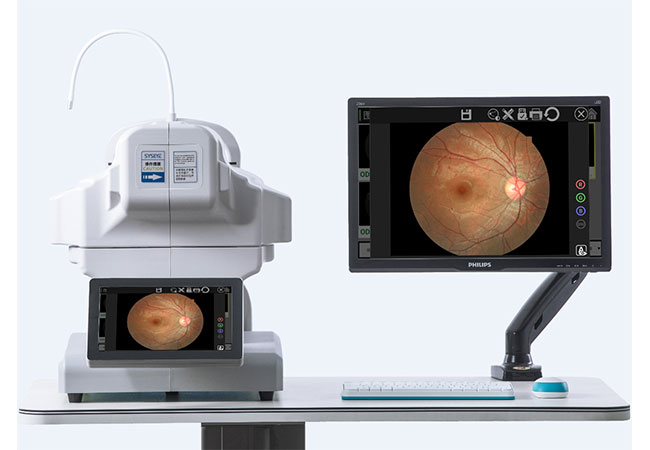
Write a short workflow before the demo: preparation, positioning, acquisition, review, storage or printing, cleaning according to supplied instructions, and handoff. The sequence should reflect the buyer’s intended service, while clinical decisions remain with qualified professionals. During the demonstration, note where the workflow differs from that plan. A feature is useful only if the clinic can incorporate it without creating an unassigned task.
We recommend asking a user, a technical or facilities representative, and the procurement owner to watch the same session. Each person sees a different risk. A user notices controls and hand movements. Facilities staff notices power, furniture, and cable implications. Procurement notices which claims are supported by documents. Their notes should remain factual: “the operator needed a second confirmation” is more useful than “easy to use.”
Observe repeatability, not a highlight
A presenter may choose an ideal sequence. Ask which steps vary with patient cooperation, operator skill, room lighting, or accessory choice. If the demo includes an image or measurement, record the conditions and the stated limitations; do not convert a single observation into an accuracy or clinical-performance claim. We do not invent test results, patient stories, or percentages.
Ask what happens when the desired output is not obtained. Can the operator identify a next safe step, or does the issue require technical support? This is a procurement question, not an invitation to improvise repairs. A useful demo makes escalation boundaries visible.
Finally, record training questions. If staff need a manual, formal training, or supervised familiarization, make that part of the implementation plan. The Hongdee service page offers a route for discussing support scope, but the exact training and service arrangements must be confirmed for the proposed order.
How do you verify documents, limitations, and risk boundaries?
A demo answers only some questions. The next decision is whether the supplier can provide enough documentation for safe acceptance, local review, and responsible operation.
Request the applicable manual, specifications, included-accessory list, maintenance guidance, safety warnings, and support route, and separate supplier statements from documents that still require local verification.
Ask for evidence tied to the exact unit
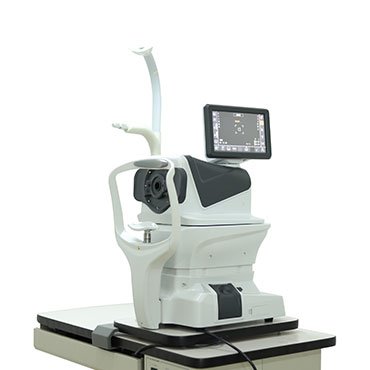
Request a quotation and technical packet that use the same model and configuration identifiers. Compare names, ratings, interfaces, and required accessories. If a document refers to a product family, ask which statements apply to the quoted unit. Do not assume that a family-level description proves every option is present.
The World Health Organization’s procurement resource guide provides foundational procurement guidance, not a current country-specific rulebook. Its value here is the discipline of defining requirements and documenting evaluation. A buyer should still consult the competent authority and qualified professionals for applicable local requirements.
Create a limitations register. It can include items such as operator training, site preparation, software licensing, local electrical review, cleaning instructions, data handling, and service escalation. A limitation is not automatically a reason to reject the product. It is a reason to assign an owner and a verification step before release.
Keep safety boundaries explicit
No demonstration justifies opening a housing, touching exposed electrical parts, defeating an interlock, or bypassing a lockout. If the equipment appears damaged, overheats, emits an unusual smell, or behaves unpredictably, stop the session and request authorized technical support. The buyer should not test a suspected hazard by repeating it.
Also identify what the demo did not establish. It may not establish local regulatory acceptance, long-term reliability, compatibility with every accessory, or suitability for every patient. We recommend writing “not assessed” rather than allowing silence to become approval. Clear uncertainty protects both the buyer and future users.
What decision gate should you use before placing the order?
The final decision is whether remaining uncertainty is acceptable, assigned, and reflected in the order documents. A structured gate makes the answer reviewable.
Approve only when the configuration, workflow, documents, safety boundaries, site dependencies, and unresolved questions have named owners and written disposition; otherwise pause or request a narrower quote.
Use a red-amber-green review
Mark each topic green only when it is supported by the proposed configuration and documentation. Use amber when a supplier or local professional must confirm it. Use red when the observed condition conflicts with the intended use, a safety question is unresolved, or a required item is absent. An amber item needs an owner and deadline; a red item blocks commitment.
| Gate | Green evidence | Hold condition |
|---|---|---|
| Configuration | Demo and quote identifiers match | Model or option is unclear |
| Workflow | Intended users understand steps and limits | Critical handoff is unassigned |
| Documentation | Required manuals and lists are available | Family-level claims remain unlinked |
| Site readiness | Dependencies are identified | Power, furniture, or data needs are unknown |
| Safety | No unresolved hazard observed | Damage or abnormal behavior appears |
Keep the signed or approved review with the quotation. If the order changes later, repeat the comparison rather than relying on memory. For a confirmed purchase request, the Hongdee quote contact page can support model, quantity, and destination review; it does not replace the buyer’s internal approval or local verification.
Sources and scope
- World Health Organization, “Procurement resource guide” (accessed 2026-10-12; foundational procurement-planning context, not a current universal regulation).
- National Council on Disability, “Eames Report” (accessed 2026-10-12; historical accessibility-barrier context, not a statement of current law).
Conclusion
A responsible demo decision links the observed workflow to the exact order, documents uncertainty, and stops for safety questions. Use the evidence to buy deliberately, not to reward a persuasive presentation.