


Are you struggling to decide between a portable or tabletop fundus camera for your clinic? Choosing the wrong one can waste your budget and limit your ability to screen patients effectively.
Investing in a fundus camera requires balancing portability with throughput. Tabletop units offer stability for high-volume clinics, while portable fundus cameras provide flexibility for screening missions, immobile patients, and pediatric care. Your choice depends on your practice’s physical space, patient demographics, and required image resolution.
We have helped hundreds of clinics at Hongdee navigate this exact choice. Many doctors ask about the trade-offs in image quality and the long-term ROI. In this guide, we break down everything we have learned from three years of OEM experience and serving over 300 customers worldwide.
How Do Portable and Tabletop Fundus Cameras Actually Differ in Design?
Choosing a device starts with understanding how the physical build impacts your daily work. If you pick a bulky unit for a small room, you will feel the frustration every day.
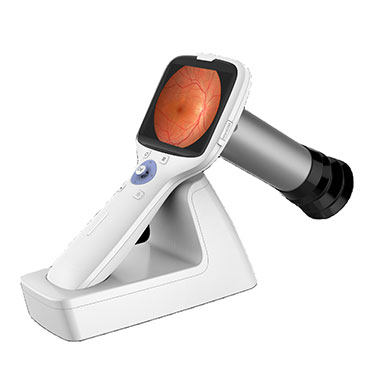
Portable fundus cameras are handheld, battery-powered devices designed for mobility and ease of use in various settings. Tabletop fundus cameras are stationary, larger units that require a dedicated instrument table and provide a fixed, stable platform for high-resolution retinal imaging in a controlled clinical environment.

Form Factor and Weight
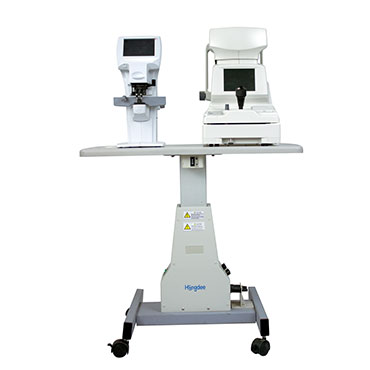
Tabletop fundus cameras are the heavyweights of the eye clinic. They usually weigh between 20kg and 30kg. They need a solid motorized table to stay steady. We often see these in large hospitals where the patient comes to the machine. The design focuses on ergonomics for the doctor, with a chin rest and headrest to keep the patient still. This stability is why many of our partners in Italy and the US prefer them for deep diagnostic work.
Portable cameras, like our handheld models, weigh less than 1kg. You can hold them with one hand. They look like a high-tech DSLR camera. They don’t have a chin rest. Instead, you move the camera to the patient. This is a game-changer for clinics in Singapore or Brazil that do community outreach. You can pack the camera in a small case and take it to a school or a nursing home.
Connectivity and Integration
Design also covers how the data moves. Tabletop units often have a built-in PC or connect directly to a large monitor. They use wired LAN or USB connections. Portable units usually rely on Wi-Fi or Bluetooth. You can see the images on a small built-in screen or send them to a tablet.
| Feature | Portable Fundus Camera | Tabletop Fundus Camera |
|---|---|---|
| Weight | < 1 kg | 20 – 30 kg |
| Power Source | Rechargeable Battery | AC Power Outlet |
| Patient Position | Sitting, Lying, or Standing | Sitting with Chin Rest |
| Space Required | Minimal (Handheld) | Fixed Table Space |
| Data Transfer | Wi-Fi / Bluetooth / SD Card | LAN / USB / Wired |
Does Portability Mean Compromised Image Quality?
We hear this concern every week: “If it’s small, is the image blurry?” Doctors worry that a handheld device cannot catch small microaneurysms.
No, modern portable fundus cameras do not necessarily mean lower quality. While tabletop units often have larger sensors and higher pixel counts for deep diagnostics, handheld models now offer 5-megapixel to 12-megapixel resolution, which is more than enough for reliable diabetic retinopathy and glaucoma screening.

Sensor Technology and Resolution
At Hongdee, we ensure our portable cameras use high-sensitivity sensors. In the past, handhelds were only for “quick looks.” Today, they capture high-definition images. A tabletop unit might give you a 45-degree field of view with 20-megapixel clarity. A portable unit typically offers a 40 to 45-degree field of view with slightly fewer pixels. But here is the truth: for 90% of screenings, you cannot see the difference with the naked eye.
Non-Mydriatic Capabilities
Both types now offer non-mydriatic imaging. This means you don’t always need to dilate the patient’s eyes. This is a huge help for patient comfort. However, tabletop units often have better internal lighting systems. They can “punch through” small pupils more easily than some lower-end portable units. We always tell our distributors in Australia and the Middle East to check the minimum pupil size requirement. Our units usually require only 3.5mm to 4.0mm, making them very versatile.
Focus and Alignment
Tabletop units have autofocus and auto-alignment. You press a button, and the 3D tracking finds the eye. Portable units require more “doctor skill.” You have to steady your hand and find the right distance. It takes a little more practice, but once you master it, the results are comparable.
| Quality Factor | Portable | Tabletop |
|---|---|---|
| Typical Resolution | 5MP – 16MP | 12MP – 24MP+ |
| Field of View | 40° – 45° | 45° – 50°+ |
| Auto-Alignment | Rare (Mostly Manual) | Common (3D Tracking) |
| Min Pupil Size | ~4.0 mm | ~3.3 mm – 3.5 mm |
| Focus Type | Manual/Electronic | Full Auto |
When Does a Portable Fundus Camera Make Sense for Your Practice?
Not every clinic needs a heavy machine. We have seen many small practices overspend on features they never use.
A portable fundus camera makes sense for practices focused on community outreach, pediatric care, or home visits. It is also ideal for satellite clinics with limited space or as a secondary device for screening bedridden patients who cannot sit at a traditional slit lamp table.
Reaching More Patients
Think about the patients who cannot come to you. We work with many distributors in Southeast Asia and Africa where “eye camps” are common. You cannot lug a 30kg tabletop unit into a rural village. A portable camera fits in your backpack. It allows you to bring the hospital to the people. Even in developed cities like California or London, doctors use them for “curbside” consults in emergency rooms or nursing homes.
The Pediatric Challenge
Children are notoriously difficult to keep still in a chin rest. If you have ever tried to get a 4-year-old to stare into a large, humming machine, you know the struggle. With a handheld camera, you can make it a game. You follow the child, not the other way around. This reduces “exam anxiety” and leads to better images. We have seen a 20% increase in successful screenings in pediatric clinics that added a portable option.
Space Savings and Flexibility
If your exam room is smaller than 10 square meters, every inch counts. A tabletop unit needs a table, a chair, and space for the doctor to move. A portable unit lives in a drawer. When you need it, you take it out. When you don’t, it’s gone. This flexibility is why many of our 60+ global distributors suggest portable units for “startup” optical shops that are just beginning to offer retinal screening.
Use Cases for Each Type
- Portable: Screening missions, ER, Pediatric clinics, Veterinary (yes, we sell many for horses and dogs!), Nursing homes.
- Tabletop: High-volume hospitals, Glaucoma specialty clinics, Research centers, Main exam rooms in busy practices.
How Do You Calculate Cost Per Patient and Payback Period for Each Type?
Money is always the big question. We don’t just sell equipment; we help you build a business. You need to know when you will get your money back.
To calculate the payback period, divide the total investment cost by the average screening fee minus operating costs. Portable units often have a lower initial price and lower maintenance costs, leading to a faster payback period of 6-12 months compared to 18-24 months for high-end tabletop units.
Initial Investment vs. Hidden Costs
A tabletop fundus camera usually costs significantly more than a portable one. But the price of the machine is just the start. You must also buy a motorized table. You need to pay for a technician to install it and calibrate it. We often see distributor margins adding 30-50% to the retail price of big-name brands. At Hongdee, we work directly with our distributors to keep these margins fair, so the doctor gets a better deal.
Portable units have almost zero installation cost. You charge the battery and start. The main recurring cost for both is the “doctor’s time” and the storage of images (Cloud or Server).
Calculating ROI (Return on Investment)
Let’s look at a simple example. If you charge $50 for a retinal screening.
- Portable: Lower cost, but maybe you only do 5 screenings a day because you are traveling.
- Tabletop: Higher cost, but you can do 20 screenings a day because the workflow is faster in the clinic.
We have noticed that many of our clients in the Middle East use portable units to “capture” patients at vision fairs and then refer them back to the main clinic for full tabletop diagnostics. This “funnel” approach maximizes ROI for both devices.
| Cost Factor | Portable Fundus Camera | Tabletop Fundus Camera |
|---|---|---|
| Initial Price | Moderate | High |
| Installation | $0 (Self-install) | $300 – $1,000+ |
| Table Required | No | Yes (Motorized) |
| Maintenance | Low (Battery/Software) | Moderate (Moving parts/Optics) |
| Est. Payback | 6 – 10 Months | 15 – 24 Months |
What Key Specifications Should You Compare Before Buying?
Ready to buy? Don’t just look at the brand name. Look at the numbers that actually affect your patients’ results.
When comparing specifications, prioritize the field of view (min 40°), pupil size requirements (max 4.0mm), and storage capabilities. Also, ensure the device is non-mydriatic and check if the software is DICOM compatible for easy integration with your existing Electronic Medical Record (EMR) system.

Field of View (FOV)
This tells you how much of the retina you see in one shot. 45 degrees is the gold standard. Some cheap portable units only offer 30 degrees. This means you have to take multiple “tiles” and stitch them together, which is slow. We recommend looking for units that offer at least 40 degrees. Our Hongdee portable and tabletop models both hit these marks, ensuring you don’t miss peripheral lesions.
DICOM and Software
If your images stay on an SD card, you are wasting time. You need the images to flow into your patient’s file. Ask your supplier: “Is this DICOM compatible?” This allows the images to talk to your EMR. Also, check for “AI-ready” features. Many modern clinics in Europe and China now use AI to pre-screen for Diabetic Retinopathy. The fundus camera must produce “clean” enough files for the AI to read.
Battery Life and Charging
For portable units, battery is life. If the battery dies after 3 patients, it’s a paperweight. Look for a battery that lasts at least 4-6 hours of active use. We use high-capacity lithium-ion cells in our handheld units to ensure they last through a full screening day in the field. Also, check the charging method. USB-C is the best because you can use a standard power bank if you are in a remote area with no wall outlets.
Shipping and Support
Since we ship to 60+ countries, we know that “after-sales” is where many suppliers fail. Check the warranty. Does it cover the sensor? What about shipping costs for repairs? We have 300+ customers who stay with us because we handle the logistics and technical support globally, regardless of whether you are in Algeria or Singapore.
| Specification | Target Benchmark | Why It Matters |
|---|---|---|
| FOV | 45 Degrees | Seeing more retina in one shot |
| Pupil Size | < 4.0 mm | Screening without dilation |
| Storage | Cloud / DICOM | Professional record keeping |
| Light Source | LED / White | Patient comfort and color accuracy |
| Weight | < 1kg (Portable) | Preventing doctor fatigue |
Conclusion
Choosing between portable and tabletop fundus cameras depends on your workflow. For outreach and space-saving, go portable. For high-volume, stable clinical diagnostics, choose tabletop. Both offer excellent ROI when matched with the right patient needs and practice size.